GPT Image 2.5 Sunburst API and MCP for AI agents
TollNode gives Claude, Cursor or any AI agent GPT Image 2.5 Sunburst, OpenAI's most capable image model for detailed scenes, dense text and diagrams, over API and MCP, from $0.018 per image, with no subscription.
Ask for 'a clean infographic poster titled HOW TO BREW POUR-OVER COFFEE with four numbered steps' and get a finished image link back.
No subscription · Sign-up optional · From $0.018 per call · Charged only when it works · No OpenAI account needed
 Claude Code
Make a 2:3 infographic poster titled HOW TO BREW POUR-OVER COFFEE with four numbered steps, each with a small illustration and a one-line caption, quality medium
TollNode · OpenAI · medium$0.065 · 1 image
| Result | Detail |
|---|---|
| File | 1 image link, does not expire |
| Aspect ratio | 2:3 |
| Quality | medium |
Real result, shown below.
GPT Image 2.5 Sunburst image examples
Made by this node in our own tests, from the request shown under each.
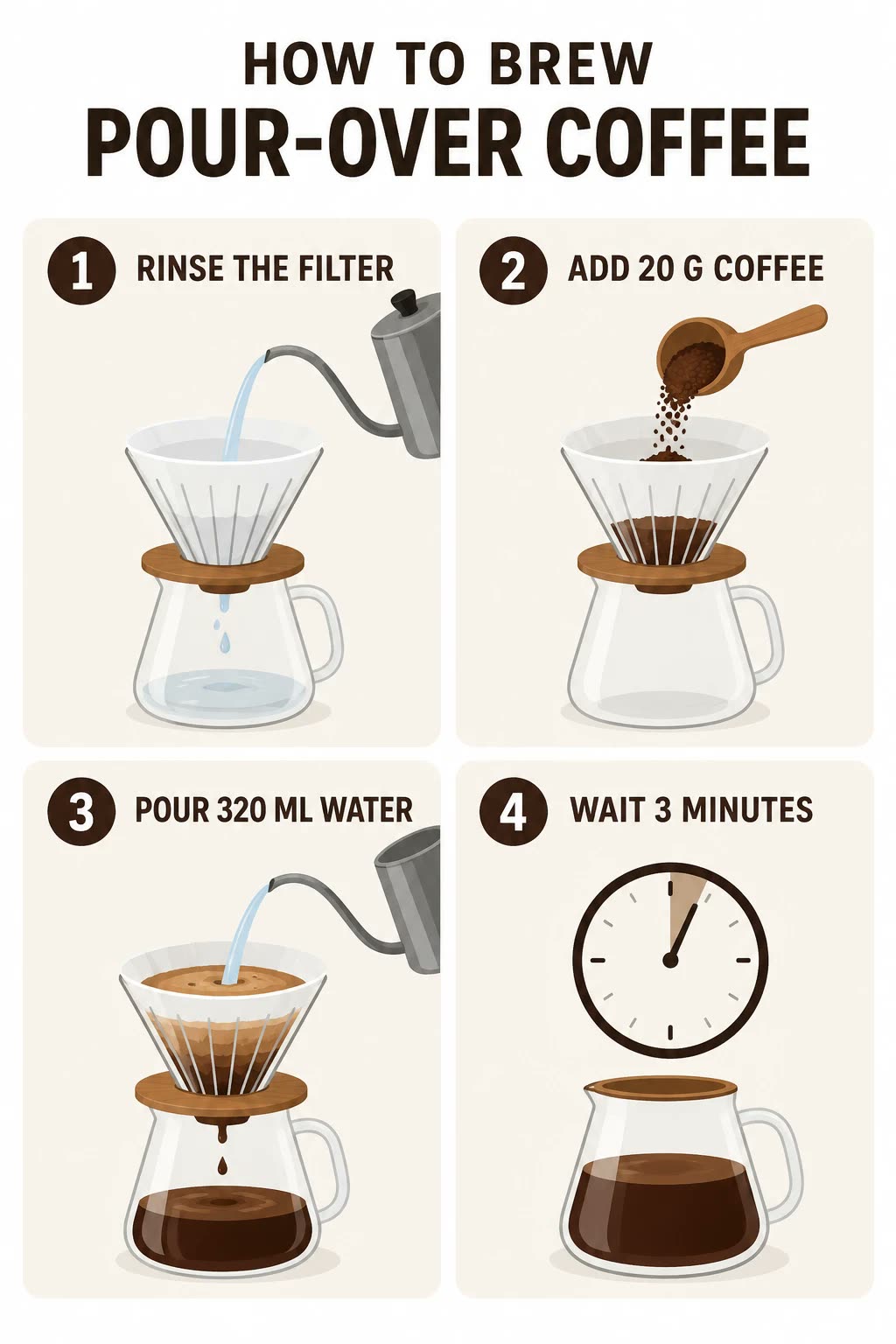
“A clean infographic poster titled HOW TO BREW POUR-OVER COFFEE with four numbered steps, each with a small flat illustration and a one-line caption: 1 RINSE THE FILTER, 2 ADD 20 G COFFEE, 3 POUR 320 ML WATER, 4 WAIT 3 MINUTES”
The request that made it
Send the same body to get this kind of result. Change the prompt or the options to get your own.
{
  "prompt": "A clean infographic poster titled HOW TO BREW POUR-OVER COFFEE with four numbered steps, each with a small flat illustration and a one-line caption: 1 RINSE THE FILTER, 2 ADD 20 G COFFEE, 3 POUR 320 ML WATER, 4 WAIT 3 MINUTES",
  "quality": "medium",
  "aspect_ratio": "2:3"
}
What you control with GPT Image 2.5 Sunburst
Prompt and style
GPT Image 2.5 Sunburst prompt to image
Describe the scene, text or diagram in plain words.
- Prompt
- A clean infographic poster titled HOW TO BREW POUR-OVER COFFEE with four numbered steps...
- Aspect ratio
- 2:3
- Returns
- 1 image link
You get
- prompt: what to create or change, up to 2,000 characters
- aspect_ratio: 7 fixed shapes from 1:1 to 9:16, default 1:1
- output_format: png, jpeg or webp
Reference images
Edit from up to six references
Give it up to six photos to edit or combine.
- input_images
- up to 6 reference image URLs
- background
- auto (default)
- Prompt
- what to change or how to combine them
You get
- input_images: up to 6 https image URLs, optional
- background: auto, transparent or opaque
- prompt: what to change or how to combine them
- from $0.018
Quality and price
Five quality levels, one price each
Pick a quality level; the price follows it.
- Default quality
- medium
- Quality range
- low to max
- output_format
- png (default)
You get
- quality: low, medium, high, xhigh or max, sets the price
- output_format: png, jpeg or webp
Failed calls are never charged, and image links returned by TollNode don't expire.
What people ask their AI to do with it
Teachers
Classroom posters and diagrams
“Make a 4:3 poster explaining the water cycle with labeled diagrams and short captions for a 5th grade class”
medium
Cost today$0.065
Marketers
Ad creative with dense on-image text
“Create a 16:9 ad banner for a SaaS tool with a bullet list of three features and the headline SHIP FASTER”
high
Cost today$0.174
Startup founders
Pitch deck diagrams and charts
“Draw a 3:2 diagram showing our three-step onboarding flow with icons and short labels for my pitch deck”
medium
Cost today$0.065
Technical writers
Step-by-step instructional diagrams
“Make a 1:1 diagram showing how to set up a Wi-Fi router in four numbered steps with small icons”
medium
Cost today$0.065
Ecommerce sellers
Packaging mockups with readable labels
“Generate a 4:3 mockup of a cereal box with the brand name CRUNCH MORNING and a nutrition facts panel”
high
Cost today$0.174
Designers
Edit a client photo from references
“Take this logo and this storefront photo and show the storefront with the logo added to the sign, keep the lighting consistent”
high
Cost today$0.174
Use it as a GPT Image 2.5 Sunburst MCP server in Claude, Cursor or Codex
Connect once. Then just ask.
Paste this into Claude Code, Cursor or Codex. It connects TollNode and gives your agent a small wallet. Add a few dollars of USDC and you're done.
npx agentcash add https://tollnode.comCopy for your AI agent
Paste this into your agent so it knows what this node does and how to call it.
You can use TollNode's GPT Image 2.5 Sunburst node to create and edit images. Call POST https://tollnode.com/api/v1/nodes/gpt-image-2-5-sunburst with prompt (required, up to 2,000 characters), quality (low, medium, high, xhigh or max, sets the price), aspect_ratio (1:1, 3:2, 2:3, 4:3, 3:4, 16:9 or 9:16), background (auto, transparent or opaque), output_format (png, jpeg or webp) and input_images (up to 6 https image URLs, optional). The price depends on quality and is charged only when an image is returned. Over MCP, call the "gpt-image-2-5-sunburst" tool; use list_models to see prices. Give me the image link when it is done.Price
from $0.018
per image
The price depends on the quality you choose. If you don't choose, you get medium.
| low | $0.018 per image |
| mediumdefault | $0.065 per image |
| high | $0.174 per image |
| xhigh | $0.339 per image |
| max | $0.676 per image |
Charged only when a call returns a result. Failed or empty calls cost $0.
GPT Image 2.5 Sunburst without an OpenAI account
No subscription, no credit packs
Pay per image: $0.018 at low quality up to $0.676 at max quality.
No OpenAI account, no API key setup
Your agent calls TollNode. You never create an OpenAI account or manage keys.
Only charged when it works
If generation fails or returns nothing, the call costs nothing.
One connection, many image models
The same setup also gives your agent FLUX, Nano Banana, Seedream and others, so it can compare results.
FAQ
- Is this the official OpenAI API?
- No. TollNode is an independent service. It gives your agent access to GPT Image 2.5 Sunburst through its own API and MCP server, priced per image, with no OpenAI account needed.
- Can I use it as a GPT Image 2.5 Sunburst MCP server in Claude?
- Yes. Add https://tollnode.com/mcp in Claude Code, Claude Desktop or Cursor, and the "gpt-image-2-5-sunburst" tool appears with its options and prices.
- What quality levels and shapes can I get?
- Five quality levels (low, medium, high, xhigh, max) that set the price, and seven aspect ratios from 1:1 to 9:16. Medium and 1:1 are the defaults.
- Can it edit my own photos?
- Yes. Send up to 6 image URLs in input_images and describe the change. Use background to request a transparent or opaque result.
- What image formats can I get?
- png, jpeg or webp, set with output_format. png is the default.
- What if no image comes back?
- You're not charged. TollNode only collects payment when a usable image is returned.
- How long are the image links valid?
- They don't expire. Download the file or keep the link.
Works well with
- GPT Image 2 generation and editingRun the same prompt on an earlier OpenAI image model to comparefrom $0.018
- Crisp image upscalerEnlarge a finished poster or diagram for print$0.010
- Background removalClean up a reference photo before you edit it in$0.026
- Veo 3.1 video with soundTurn a finished image into a short video with soundfrom $2.161
Ready in a minute
Connect your AIFor developers: endpoint, inputs and an example response
POST https://tollnode.com/api/v1/nodes/gpt-image-2-5-sunburst
Input
| Field | Type | Notes |
|---|---|---|
| size | enum | Output size, same price: 1K (about 1 megapixel, default, every aspect ratio), 2K (2048 px on the long side; 1:1, 16:9 or 9:16) or 4K (3840x2160 or 2160x3840; 16:9 or 9:16) (1K, 2K, 4K) |
| prompt* | string | What to create or change |
| quality | enum | Sets the price. Default medium (low, medium, high, xhigh, max) |
| background | enum | (auto, transparent, opaque) |
| aspect_ratio | enum | Aspect ratio, default 1:1 (1:1, 3:2, 2:3, 4:3, 3:4, 16:9, 9:16) |
| input_images | array | Reference or source image URLs (https), optional. Or send the file inline as a base64 data: URI (up to 4.5 MB) |
| output_format | enum | (png, jpeg, webp) |
Example response
{
  "images": [
    "https://tollnode.com/api/v1/files/00000000-0000-0000-0000-000000000000/0"
  ]
}
Also described in the OpenAPI file and llms.txt. Setup for every app: Agents & MCP.