Qwen Image 2 API and MCP server for AI agents
TollNode gives Claude, Cursor or any AI agent Qwen Image 2, Alibaba's image model with accurate text, for new images or edits, over API and MCP, from $0.049 per image, with no subscription.
Ask for 'A glowing red neon sign reading "OPEN 24 HOURS" above the...' and get a finished image link back in seconds.
No subscription · Sign-up optional · From $0.049 per call · Charged only when it works · No Alibaba account needed
 Claude Code
Make this image: A glowing red neon sign reading "OPEN 24 HOURS" above the door of a small...
TollNode · Alibaba Qwen · qwen-image-2$0.049 · 1 image
| Result | Detail |
|---|---|
| File | 1 image link, does not expire |
| Shape | 16:9 |
Real result, shown below.
Qwen Image 2 examples
Made by this node in our own tests, from the request shown under each.
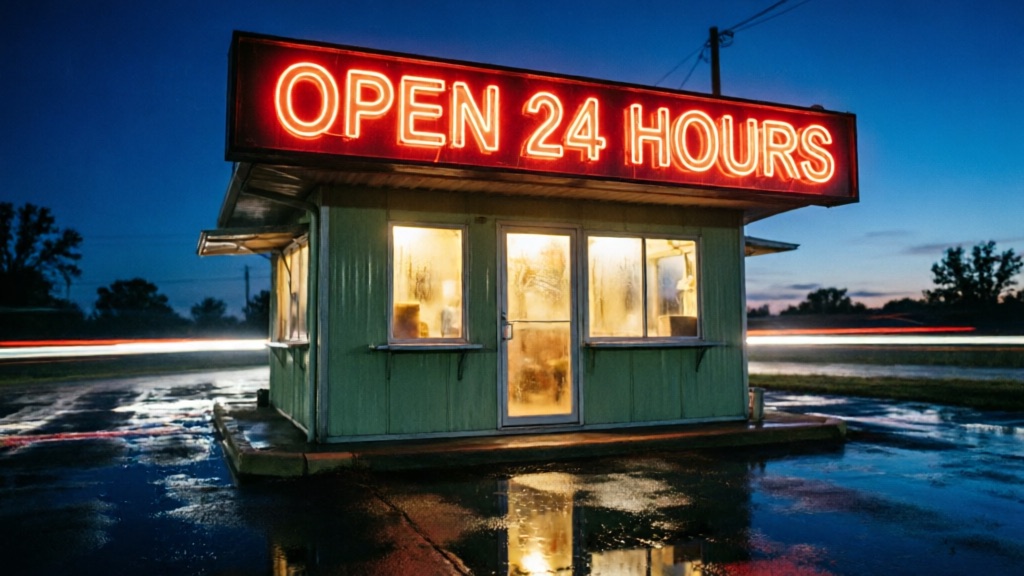
“A glowing red neon sign reading "OPEN 24 HOURS" above the door of a small roadside diner at night, wet asphalt reflecting the light, cinematic photograph”
The request that made it
Send the same body to get this kind of result. Change the prompt or the options to get your own.
{
  "prompt": "A glowing red neon sign reading \"OPEN 24 HOURS\" above the door of a small roadside diner at night, wet asphalt reflecting the light, cinematic photograph",
  "aspect_ratio": "16:9"
}
What you control with Qwen Image 2
Prompt and style
Qwen Image 2 prompt to image
Describe the picture in plain words, including any text.
- Prompt
- A glowing red neon sign reading "OPEN 24 HOURS" above the door of a...
- Aspect ratio
- 16:9
- Returns
- 1 image link
You get
- prompt: what to create, in plain words
- negative_prompt: what you do not want to see
- aspect_ratio: the shape of the result: 1:1 to 1:2
- seed: repeat a result by reusing the number
Reference images
Add photos to edit, restyle or combine.
- image
- https://.../photo.jpg
- Prompt
- A glowing red neon sign reading "OPEN 24 HOURS" above...
- Returns
- 1 image link
You get
- image: the image to use (https link)
- prompt: what to create, in plain words
Result and price
Qwen Image 2 output
One flat price per image.
- Returns
- 1 image link
- Price
- flat, image
- Charged
- only when a result comes back
You get
- result: a link to the finished image file
- price: one flat price per image
Failed calls are never charged. Image and audio links returned by TollNode don't expire.
What people ask their AI to do with it
Ecommerce sellers
Product photos without a shoot
“Make a studio photo of my ceramic mug on a marble counter in morning light”
1 call
Cost today$0.049
Marketers
Ad and social images
“Create three portrait Instagram ad images for a coffee subscription, bold and bright”
3 calls
Cost today$0.147
Designers
Concept art and mockups
“Generate three packaging concepts for an oat milk brand, flat lay on a gray background”
3 calls
Cost today$0.147
Founders
Pitch deck visuals
“Draw a wide hero image of a delivery drone over a US suburb at sunset for my seed deck”
1 call
Cost today$0.049
Content creators
Thumbnails and blog headers
“Make a wide YouTube thumbnail of me pointing at a glowing laptop with big bold text”
2 calls
Cost today$0.098
Educators
Diagrams and class visuals
“Illustrate the water cycle for fourth graders, labeled, clean flat style”
1 call
Cost today$0.049
Use it as a Qwen Image 2 MCP server in Claude, Cursor or Codex
Connect once. Then just ask.
Paste this into Claude Code, Cursor or Codex. It connects TollNode and gives your agent a small wallet. Add a few dollars of USDC and you're done.
npx agentcash add https://tollnode.comCopy for your AI agent
Paste this into your agent so it knows what this node does and how to call it.
You can use TollNode's Qwen Image 2 node to make an image. Call POST https://tollnode.com/api/v1/nodes/qwen-image-2 with image (optional), prompt (required), aspect_ratio (optional), negative_prompt (optional). The price is one flat price per call and is charged only when a result is returned. Over MCP, call the "qwen-image-2" tool; use list_models to see prices. Give me the file link when it is done.Price
$0.049
per image
Charged only when a call returns a result. Failed or empty calls cost $0.
Qwen Image 2 without a Alibaba account
No subscription, no credit packs
Pay per image: $0.049 for every call, whatever you ask for.
No Alibaba account, no quota form
Your agent calls TollNode. You never set up billing with the model's maker or request access.
Only charged when it works
If generation fails or returns nothing, the call costs nothing.
One connection, many image models
The same setup also gives your agent other models and live data tools, so it can compare results.
FAQ
- Is this the official Alibaba API?
- No. TollNode is an independent service. It gives your agent access to Qwen Image 2 through its own API and MCP server, priced per image, with no Alibaba account needed.
- Can I use it as a Qwen Image 2 MCP server in Claude?
- Yes. Add https://tollnode.com/mcp in Claude Code, Claude Desktop or Cursor, and the "qwen-image-2" tool appears with its options and prices.
- How much does a call cost?
- One flat price per image, the same for every call, shown above. There is nothing to choose that changes it.
- Can I start from my own image?
- Yes. Send an image link in image (https) along with your prompt. The result is built from it.
- What if nothing comes back?
- You're not charged. TollNode only collects payment when a usable result is returned.
- How long are the links valid?
- They don't expire. Download the file or keep the link.
- How do I pay for Qwen Image 2?
- Your agent sends the request, gets an HTTP 402 with the exact price (from $0.049 per call), signs a USDC payment on Base and retries. Or use an account balance with an API key. Either way you are charged only when a result comes back.
- What does the Qwen Image 2 response look like?
- A JSON object with a link to the finished file. The link does not expire, so you can download it later or keep the link.
Works well with
- Qwen Image 3 Pro generation and editingAnother image model to compare on the same prompt$0.055
- Qwen Image 3 generation and editingAnother image model to compare on the same prompt$0.042
- Crisp image upscalerEnlarge the finished image for print$0.010
- Nano Banana Pro image generationA high-quality image model to comparefrom $0.204
Ready in a minute
Connect your AIFor developers: endpoint, inputs and an example response
POST https://tollnode.com/api/v1/nodes/qwen-image-2
Input
| Field | Type | Notes |
|---|---|---|
| seed | integer | |
| image | string | Optional image to edit or use as reference (https URL). Or send the file inline as a base64 data: URI (up to 4.5 MB) |
| prompt* | string | What to create or change |
| aspect_ratio | enum | Aspect ratio, default 1:1 (1:1, 16:9, 9:16, 4:3, 3:4, 3:2, 2:3, 2:1, 1:2) |
| negative_prompt | string | What you do not want to see |
Example response
{
  "images": [
    "https://tollnode.com/api/v1/files/00000000-0000-0000-0000-000000000000/0"
  ]
}
Also described in the OpenAPI file and llms.txt. Setup for every app: Agents & MCP.